WhatsML
  • Why WhatsML
  • Technologies versions
  • How to install WhatsML
    • Server Requirements
    • Install in local server
    • Install with AAPANEL
  • How to install Whatsapp Server
    • Whatsapp Server Installation
  • Admin Panel
    • Admin Login
    • Admin Dashboard
    • Edit profile and password
    • Payment gateway settings
    • Customers
    • Subscriptions & Plan
    • Orders & order settings
    • Frotnend Appearance
      • Blogs
      • Faq's
      • Multi language
      • Menu Builder
      • Custom Page
      • Partner
      • Seo
      • Team
    • Site Settings
      • Logo favicon
      • Page Settings
      • Sub Admin
        • Role
        • Admin
  • User Panel
    • Dashboard
    • Workspace
    • Team members
    • AI Tools
    • AI Training (Fine Tuning)
      • Openai
    • Activity Logs
    • Whatsapp Number Scanner
    • Phone Number Scrapping
    • Whatsapp Cloud API
      • Overview
      • Devices
      • Chats
      • Campaigns
      • Messaging Templates
      • Quick Reply
      • Auto Replies
      • Audiences
      • Group
      • REST API (My Apps)
    • Whatsapp Web API
      • Overview
      • Devices
      • Warm Up
      • Campaigns
      • Messaging Templates
      • Send Message
      • Send Bulk Message
      • Quick Reply
      • Auto Replies
      • Customers
      • Group
      • REST API (My Apps)
    • Accountsettings
    • Subscription
  • Configurations
    • Pusher Settings
    • Google Place API Settings
    • Cron Jobs Settings
    • SMTP Settings
    • Social Login Settings
  • Changes Log
  • How to setup module
  • Why WhatsML
  • Technologies versions
  • How to install WhatsML
    • Server Requirements
    • Install in local server
    • Install with AAPANEL
  • How to install Whatsapp Server
    • Whatsapp Server Installation
  • Admin Panel
    • Admin Login
    • Admin Dashboard
    • Edit profile and password
    • Payment gateway settings
    • Customers
    • Subscriptions & Plan
    • Orders & order settings
    • Frotnend Appearance
      • Blogs
      • Faq's
      • Multi language
      • Menu Builder
      • Custom Page
      • Partner
      • Seo
      • Team
    • Site Settings
      • Logo favicon
      • Page Settings
      • Sub Admin
        • Role
        • Admin
  • User Panel
    • Dashboard
    • Workspace
    • Team members
    • AI Tools
    • AI Training (Fine Tuning)
      • Openai
    • Activity Logs
    • Whatsapp Number Scanner
    • Phone Number Scrapping
    • Whatsapp Cloud API
      • Overview
      • Devices
      • Chats
      • Campaigns
      • Messaging Templates
      • Quick Reply
      • Auto Replies
      • Audiences
      • Group
      • REST API (My Apps)
    • Whatsapp Web API
      • Overview
      • Devices
      • Warm Up
      • Campaigns
      • Messaging Templates
      • Send Message
      • Send Bulk Message
      • Quick Reply
      • Auto Replies
      • Customers
      • Group
      • REST API (My Apps)
    • Accountsettings
    • Subscription
  • Configurations
    • Pusher Settings
    • Google Place API Settings
    • Cron Jobs Settings
    • SMTP Settings
    • Social Login Settings
  • Changes Log
  • How to setup module
Question? Give us feedback →
  • User Panel
  • Whatsapp Cloud API
  • Group

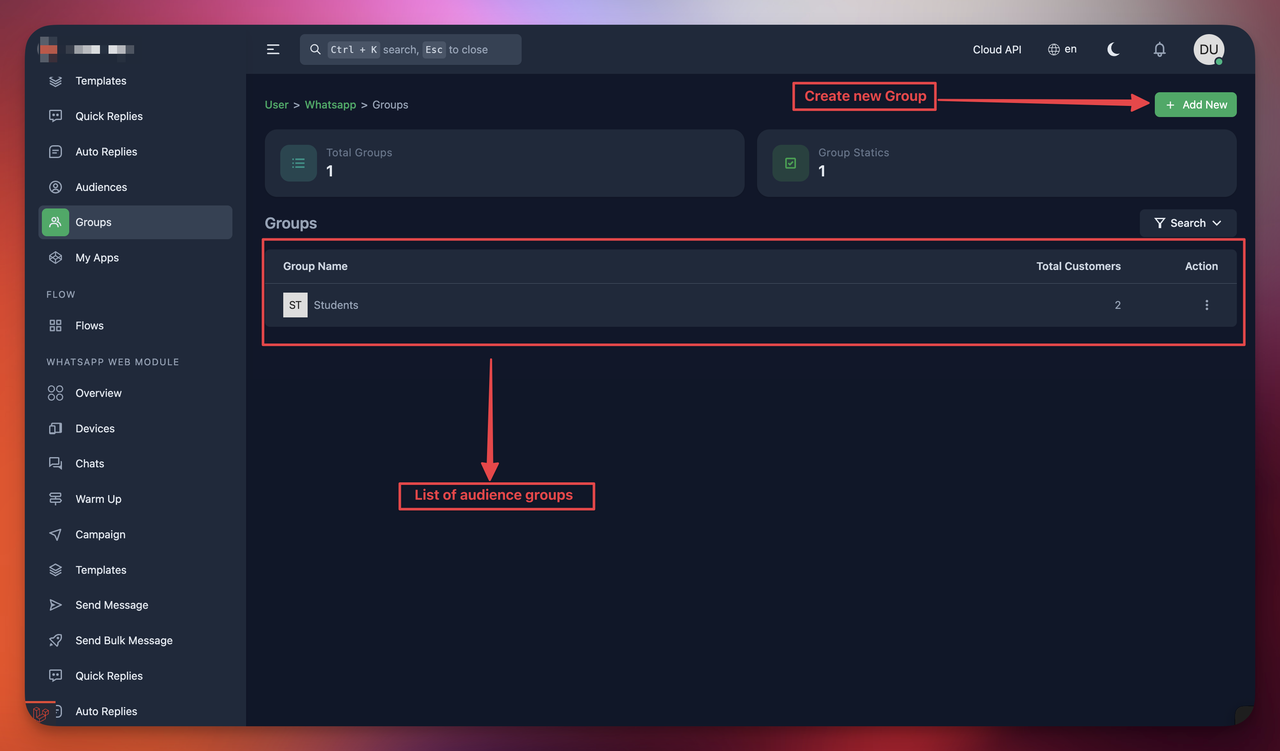
Audience Groups

Open your browser & go to https://your-domain/user/whatsapp/groups
Or click to Groups from Whatsapp Module option from sidebar


Why Groups?

Using this module you can organize the audiences via grouping its also required to sent campaigns.


Overview
AudiencesREST API (My Apps)

Copyright 2026 © AMCoders. All Rights Reserved.